How to transcribe WhatsApp Web voice messages on your computer
Updated
Install the free Prontei extension in Chrome or Firefox, open WhatsApp Web and click the hummingbird next to a voice message. The text appears right below the message, and transcription happens on your computer.
What you need
- A computer running Windows, macOS or Linux. Prontei doesn’t work on phones or tablets.
- Google Chrome 120 or newer, or Firefox 153 or newer.
- About 1 GB of free space for the transcription model, which downloads once.
Not sure? Test your browser: it takes a few seconds and downloads nothing.
Step by step
-
Install Prontei
In Chrome, install it from the Chrome Web Store. In Firefox, from Firefox Add-ons. Either way, the extension updates itself. The details are in the download section.
-
Open WhatsApp Web
Go to
web.whatsapp.comand log in. If WhatsApp Web was already open before you installed Prontei, reload the tab: tabs opened before the installation don’t change on their own. -
Click the hummingbird
Open a chat and click the hummingbird next to the voice message. Only that message is transcribed.
-
The first time, allow the download
Prontei shows the model size and asks your permission to download it. Click “Download and transcribe”. This happens only once; after that, new voice messages use the model already on your computer.
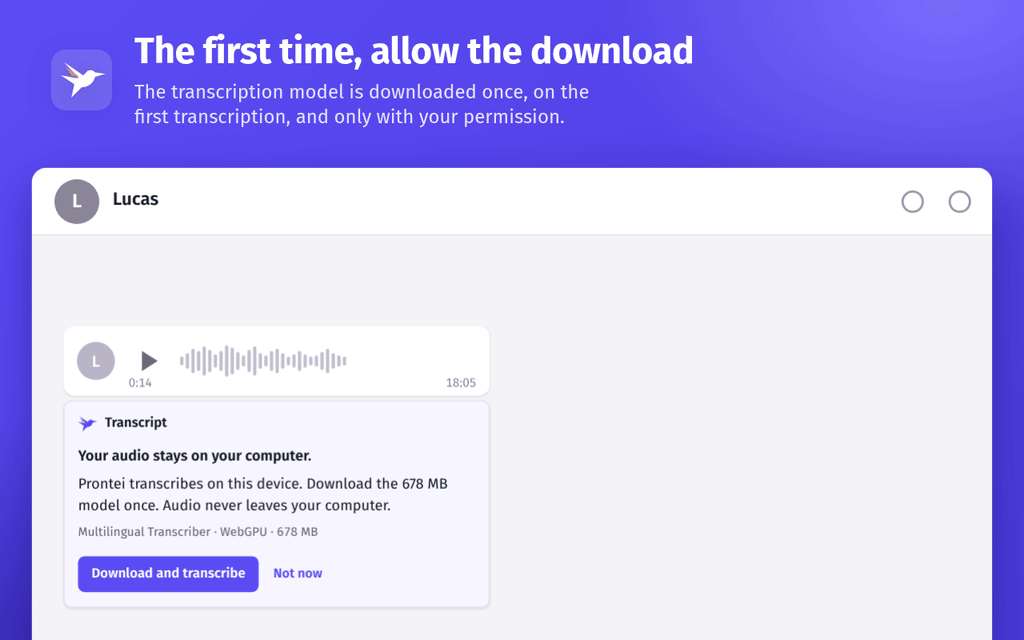
On your first transcription, Prontei asks permission to download the model. -
Copy the text
The transcript appears right below the voice message, with a “Copy” button. It stays saved on your computer, so it’s still there when you come back to the chat.
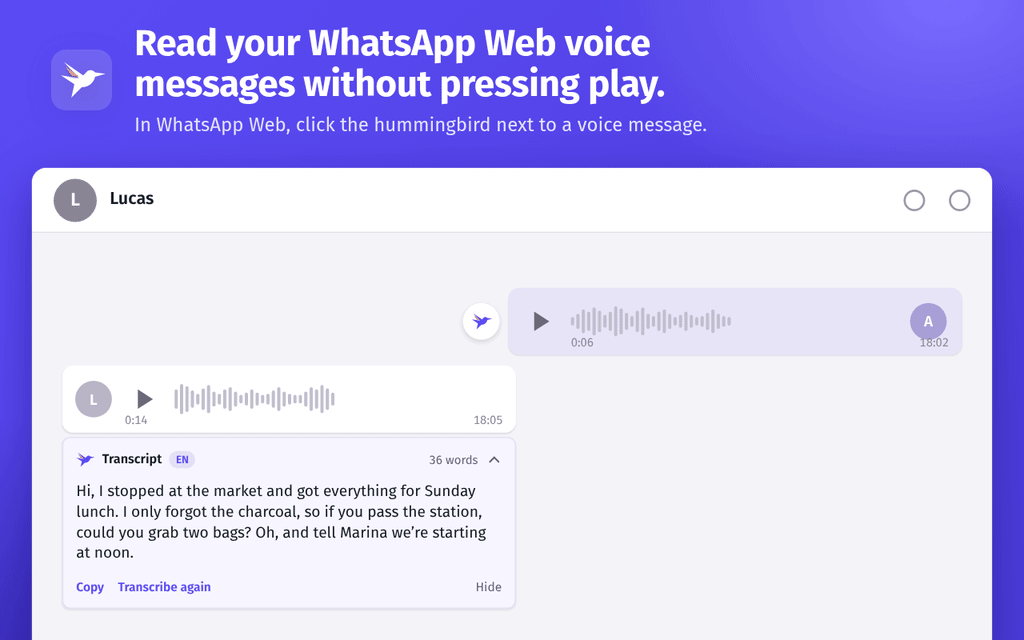
The text appears in the chat itself, ready to copy. Demo conversation.
In Firefox: the processing tab
In Firefox, Prontei opens its own tab to transcribe. Keep it open while you use transcription. If it closes in the middle of a voice message, that transcription is interrupted; just click “Try again” on the message. The tab closes on its own after a few minutes without use.
Limits
- Each voice message can be up to 15 minutes long.
- Computer only, in WhatsApp Web in Chrome or Firefox.
- Automatic transcription can get words wrong. Check the audio before you rely on the text for anything important.
Frequently asked questions
Is it really free?
Yes. Prontei is free, with no usage limits, no subscription and no sign-up.
Do I need an internet connection?
WhatsApp Web does, and the model downloads from the internet the first time. The transcription itself happens on your computer: your audio isn’t uploaded to a transcription service.
Which languages does it support?
The Multilingual Transcriber recognizes 25 languages. There’s also a transcriber dedicated to Brazilian Portuguese.
Where are the transcripts stored?
On your computer, in the browser where you installed Prontei. To delete the transcripts, preferences and models, uninstall the extension. See the privacy policy.
Does it work on my phone?
No. Prontei is an extension for WhatsApp Web on a computer. On phones, WhatsApp itself offers voice message transcripts on some devices and in some languages.